
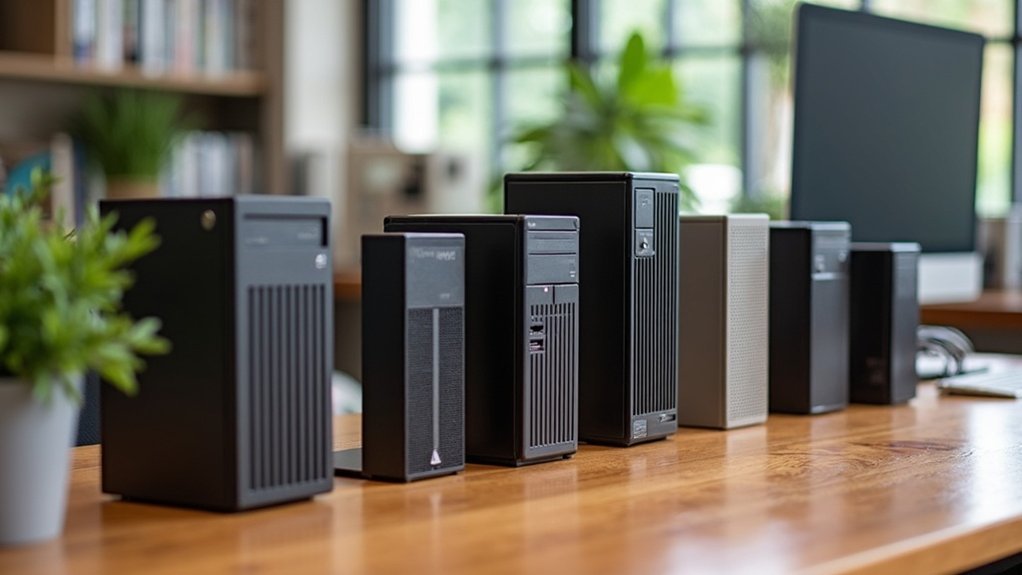
When it comes to keeping your workspace organized and efficient, choosing the right CPU holder is essential. Options like the Adjustable Mobile CPU Stand with Caster Wheels and VIVO Adjustable Under Desk Mount offer great versatility and mobility. You can also consider the VIVO Computer Mid-Tower Cart for more stability. With so many options tailored to different needs, you’ll find just the right fit to elevate your setup. Discover more about these top picks and their features!
Adjustable Mobile CPU Stand with Caster Wheels

If you’re a gamer or a student looking to maximize your workspace efficiency, the Adjustable Mobile CPU Stand with Caster Wheels is an excellent choice. This ventilated stand fits most PC towers, with adjustable widths between 7.87 and 11.81 inches. Its perforated design enhances airflow, keeping your computer cool and prolonging its lifespan. You’ll appreciate the four 360° wheels for easy movement, and the locking feature guarantees stability. Assembly takes just 15 minutes, and the elevated design simplifies cable management and cleaning. With a sturdy construction supporting up to 88 lbs, it’s perfect for heavy gaming setups or tight student spaces.
Best For: Gamers and students seeking an efficient and organized workspace for their computer towers.
Pros:
- Easy Mobility: Equipped with four 360° rotating wheels for smooth movement and two locking wheels for added stability.
- Ventilated Design: The perforated structure enhances airflow, promoting better heat dissipation for improved performance and longevity of your PC.
- Quick Assembly: Tool-free assembly takes only about 15 minutes, making it convenient for users who need a fast setup.
Cons:
- Weight Limit: Supports up to 88 lbs, which may not accommodate exceptionally heavy or oversized gaming PCs.
- Limited Color Options: Available only in black, which might not suit all aesthetic preferences.
- Adjustment Range: The adjustable width may not fit very wide or custom-built PC towers beyond the specified range.
VIVO Adjustable Under Desk and Wall PC Mount (MOUNT-PC01)

The VIVO Adjustable Under Desk and Wall PC Mount (MOUNT-PC01) is an ideal solution for anyone looking to maximize their workspace efficiency and maintain a clutter-free environment. With a sturdy solid steel construction, it holds up to 22 lbs, making it suitable for most standard PC cases. You can easily adjust the width from 3.5 to 7.8 inches and the height from 11.5 to 20.5 inches. The 135° swivel feature allows for quick access to ports and cables. Installation takes about 10 minutes, ensuring you can enjoy an organized workspace without hassle. Just remember to check your PC’s dimensions before purchasing!
Best For: Individuals seeking to optimize their workspace by freeing up desk space and improving airflow around their PC.
Pros:
- Sturdy Design: Built from solid steel, ensuring durability and stability for most standard-sized PC cases.
- Adjustable Dimensions: Offers customizable width and height adjustments to fit various PC sizes and desk setups.
- Easy Installation: Can be set up in about 10 minutes with included hardware, making it user-friendly for quick organization.
Cons:
- Compatibility Issues: May not fit larger PC cases, so users must carefully measure dimensions before purchasing.
- Quality Control: Some customers have reported receiving mounts that were crooked or had other quality issues.
- Desk Thickness Requirement: Requires a minimum desk thickness of 1 inch, which may limit installation options for some users.
VIVO Computer Mid-Tower Case with Adjustable Mobile Cart Holder (CART-PC01)

Looking for a reliable CPU holder that blends mobility and stability? The VIVO Computer Mid-Tower Case with Adjustable Mobile Cart Holder (CART-PC01) is an excellent choice. It fits ATX cases with adjustable widths from 4.7” to 8.2”, ensuring compatibility with most setups. Its durable high-grade steel construction features a sleek matte black finish and protective padding to prevent scratches. With four smooth-rolling caster wheels—two of which are lockable—you can easily move your CPU and secure it in place when needed. Plus, assembly is a breeze with included hardware and step-by-step instructions, enhancing your workspace efficiency instantly.
Best For: Individuals seeking a durable and mobile CPU holder that fits most ATX cases while providing stability and easy movement.
Pros:
- Durable Construction: Made from high-grade steel with a powder-coated finish for long-lasting use.
- Mobility Features: Equipped with four caster wheels, two of which are lockable for secure positioning.
- Easy Assembly: Comes with all necessary hardware and step-by-step instructions for quick setup.
Cons:
- Size Limitations: Adjustable width accommodates cases only up to 8.2”, which may not fit larger models.
- Weight Considerations: Heavier CPUs may require additional stability measures beyond the cart.
- Matte Finish Maintenance: The matte black surface may show dust and fingerprints more easily than glossy finishes.
Computer Tower Stand with Rolling Caster Wheels

For anyone seeking an organized and mobile workspace, the Computer Tower Stand with Rolling Caster Wheels is a game-changer. Weighing just 1.34 pounds, this adjustable stand accommodates PC towers from 8.3 to 11.4 inches wide, making it versatile for various setups. The smooth-rolling caster wheels allow you to reposition your PC effortlessly, while the locking mechanism guarantees stability during use. Elevating your tower by 3 inches enhances airflow, reducing dust intake and improving cooling for your system. With a stellar 4.7-star rating, this affordable stand is highly recommended for boosting efficiency and accessibility in your workspace.
Best For: Individuals seeking an organized, mobile workspace that enhances accessibility and airflow for their PC towers.
Pros:
- Adjustable design accommodates various PC tower sizes, making it versatile for different setups.
- Smooth-rolling caster wheels allow for easy repositioning without hassle.
- Elevated design promotes better airflow and reduces dust intake, improving cooling efficiency.
Cons:
- Weight capacity may not support extremely heavy custom-built towers.
- Assembly required, which could be a drawback for some users seeking a ready-to-use solution.
- Limited color options, as it primarily comes in black, which might not suit all aesthetic preferences.
VIVO Heavy Duty Adjustable Under-Desk PC Mount (MOUNT-PC04B)
Product not found or API error.
Need a reliable solution to keep your workspace clutter-free? The VIVO Heavy Duty Adjustable Under-Desk PC Mount (MOUNT-PC04B) is your answer. It supports up to 66 lbs and features an adjustable frame that fits most PC models with five height settings (16” to 24”) and adjustable width (5” to 10”). Made from high-grade steel, it provides stability, preventing any shifting or wobbling. Its open-frame design promotes ideal airflow, which helps cool your PC and extend its life. Plus, the thick inner padding protects your equipment from scuffs and scratches, ensuring it stays looking its best.
Best For: Individuals looking to optimize their workspace by securely mounting their PC under the desk.
Pros:
- Supports up to 66 lbs, accommodating a wide range of PC models.
- Adjustable height and width settings allow for customization to fit various PC sizes.
- Open-frame design enhances airflow, promoting better cooling and longevity of the computer.
Cons:
- Requires a minimum desktop thickness of 0.75”, which may not be suitable for all desks.
- Installation may require additional tools, which could be inconvenient for some users.
- Limited to under-desk mounting, restricting placement options compared to other setups.
ToToT 14pcs Universal CPU Protection Box

If you’re searching for a reliable way to protect your CPUs, the ToToT 14pcs Universal CPU Protection Box stands out with its durable design and perfect fit for various Intel processor models. Measuring 5.5cm x 6.5cm, it accommodates LGA1150, 1151, 1155, and 1156 i3, i5, and i7 CPUs. Made from high-quality materials, these boxes promise longevity and feature a flip storage design with pin protection—no anti-static foam needed! With a customer rating of 4.3 stars, many users find it effective, though some have noted fit issues. Overall, it’s a practical addition for maintaining an organized workspace.
Best For: This product is best for computer enthusiasts and professionals looking for an effective and durable way to store and protect a variety of Intel CPUs.
Pros:
- High-quality, durable material ensures long-lasting protection for CPUs.
- Flip storage design with pin protection eliminates the need for anti-static foam.
- Compatible with multiple Intel CPU models, making it versatile for different setups.
Cons:
- Some users have reported issues with closures not fitting securely.
- Not all CPU types may fit universally, leading to potential compatibility concerns.
- Customer feedback indicates varying experiences with the product’s effectiveness.
VIVO Universal PC Wall Mount (MOUNT-PC03V)
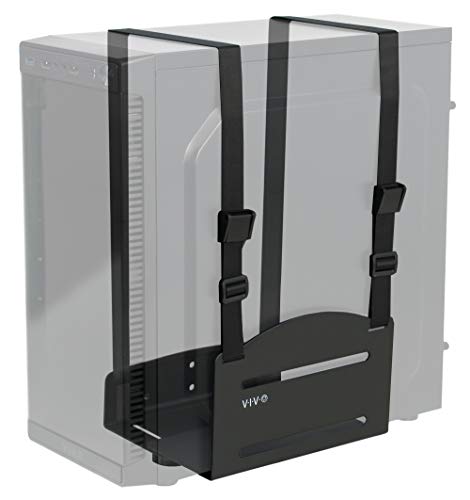
The VIVO Universal PC Wall Mount (MOUNT-PC03V) is ideal for individuals seeking to maximize their workspace while keeping their PC securely mounted and out of the way. Made from durable steel, it holds PC cases up to 10 kg and fits widths between 12.2 to 21.1 cm. By mounting your PC, you’ll free up valuable floor space and extend its life by reducing dust exposure. Installation requires wall studs for security and may need extra screws for stability. With a solid rating of 4.2 stars, users appreciate its sturdiness, although some report strap length issues for larger cases.
Best For: Individuals looking to optimize their workspace by securely mounting their PC off the floor.
Pros:
- Durable steel construction ensures long-lasting support and stability for your PC.
- Maximizes floor space by elevating the PC, allowing for a cleaner and more organized workspace.
- Compatible with most standard-sized PC cases due to adjustable width feature.
Cons:
- Installation requires wall studs, making it unsuitable for drywall-only mounting.
- Strap length may be inadequate for larger PC cases, raising security concerns.
- Some users report difficulty during installation, potentially requiring additional screws for better stability.
Factors to Consider When Choosing Cpu Holders
When choosing a CPU holder, you’ll want to contemplate several key factors. Think about the weight capacity, adjustable dimensions, and how easy it is to install. Also, don’t forget to check for mobility options and airflow design to keep your device cool and stable.
Weight Capacity Requirements
Choosing a CPU holder requires careful attention to weight capacity to confirm your setup remains stable and safe. Most models support a specific maximum weight, typically ranging from 22 lbs to 88 lbs. Make sure the CPU holder can accommodate your PC tower’s weight; exceeding the limit can compromise stability and safety. Lighter holders might be fine for standard desktops, but if you have a gaming rig or custom-built PC, opt for heavy-duty options. A holder with a higher weight capacity generally offers added durability and stability, essential for maintaining your equipment’s performance and longevity. Always check the weight specifications of the CPU holder against your PC’s weight, including peripherals, to confirm a secure fit.
Adjustable Dimensions Features
Selecting a CPU holder means not just considering weight capacity but also the adjustable dimensions that come with it. Look for holders that accommodate a range of PC cases, typically with widths from 3.5 to 11.81 inches and heights adjustable from 11.5 to 24 inches. Many models feature a width adjustment mechanism, ensuring a secure fit that protects your PC from falls. Customizing height settings can enhance your accessibility to ports and cables, making it easier for you to upgrade or connect devices. Additionally, elevating your PC off the ground improves airflow, reducing dust intake and optimizing cooling performance. Always check the specified adjustable dimensions to guarantee compatibility with your specific PC case sizes.
Mobility and Stability Options
While evaluating CPU holders, it’s crucial to prioritize mobility and stability options that fit your workspace needs. Choose models with caster wheels, especially those with four 360° rotating wheels for smooth movement and two locking wheels for stability. Verify the holder can support your PC’s weight; some models can handle up to 88 lbs, perfect for heavy gaming systems. Look for protective railings or locking mechanisms to prevent your CPU from shifting or falling while accessing ports and cables. Elevated designs are also beneficial, enhancing airflow and reducing dust intake, which promotes longevity. Finally, consider holders that allow quick assembly with minimal tools to streamline your setup and adjust mobility features effortlessly.
Installation Process Complexity
When it comes to CPU holders, installation process complexity can greatly influence your decision. Some models offer tool-free assembly, letting you set them up in about 10-15 minutes, while others may require drilling and detailed setup. If you’re considering wall or under-desk installations, verify your desk or wall meets specific thickness and clearance requirements for a secure fit. Most CPU holders include detailed assembly instructions and hardware, but be ready for possible adjustments based on your PC case dimensions. Complications can arise if the holder doesn’t fit larger cases, leading to modifications or returns. User feedback often emphasizes ease of installation, so opting for straightforward models can save you time and frustration.
Airflow and Ventilation Design
Airflow and ventilation design play an essential role in maintaining your CPU’s performance and longevity. Choosing a CPU holder that promotes proper airflow can greatly enhance cooling efficiency, reducing the risk of overheating. Elevated designs that raise your CPU off the floor allow unobstructed air circulation, which is crucial for systems with base-mounted fans. Look for perforated or open-frame designs, as they facilitate ideal airflow, especially in high-performance setups. Effective ventilation not only cools your components but also minimizes dust accumulation inside the case, preventing performance degradation over time. A well-ventilated CPU holder contributes to improved overall system performance, making cooler temperatures directly linked to better operation and reliability of your hardware components.
Material Durability and Quality
Choosing the right material for your CPU holder is essential for ensuring its durability and overall quality. High-grade steel or metal alloys can support heavy equipment, with some models capable of holding up to 88 lbs. Look for holders with protective padding; this feature safeguards your device from scratches and damage while enhancing longevity by reducing wear and tear. A powder-coated finish adds resistance against corrosion and scratches, maintaining both appearance and structural integrity over time. Sturdy construction is vital to prevent wobbling or shifting during use, ensuring your CPU remains safe. Additionally, consider designs that promote airflow, as better ventilation helps reduce overheating, ultimately supporting your CPU’s performance.
Space Optimization Strategies
To create a more organized workspace, consider how CPU holders can optimize your available space. Utilizing CPU holders that mount under desks or on walls frees up valuable floor area, making your workspace more accessible. Look for adjustable CPU holders, as they let you customize height and width to fit various PC sizes, keeping everything tidy. Elevated designs improve airflow, reducing overheating and dust buildup, which can extend your computer’s lifespan. If you need flexibility, mobile CPU stands with caster wheels make repositioning easy for better cable management and cleaning. Finally, choose holders with locking mechanisms for stability and to prevent accidental movement, ensuring secure placement during operation and maintenance.
Compatibility With PC Cases
When optimizing your workspace with a CPU holder, compatibility with your PC case is key. First, check that the adjustable width of the holder matches your PC case dimensions, as many models support widths from 7.87 to 11.81 inches. Next, confirm the height adjustments fit your case, typically ranging from 11.5 to 24 inches, to maintain proper airflow and accessibility. Don’t forget to verify the weight capacity, with most holders supporting between 22 to 88 lbs, accommodating heavier gaming or custom PCs. Additionally, consider mounting requirements, as some holders may need specific desk thickness or wall stud support. Finally, look for designs that promote airflow, enhancing cooling efficiency and reducing dust intake for your setup.
