In 2025, some of the best check scanners include the Panini VX 5050IJ, which boasts a 50 DPM speed and a 50-document feeder, and the Canon CR-120, offering a speedy 120 DPM. The Epson CaptureOne is compact and simple to set up, while the Digital Check CX30 is user-friendly but has reliability concerns. Choose wisely based on speed, capacity, and image quality. Stick around to uncover more insights on the top models!
Panini VX 5050IJ Check Scanner – 50 DPM, 50 doc Feeder, Ink Jet
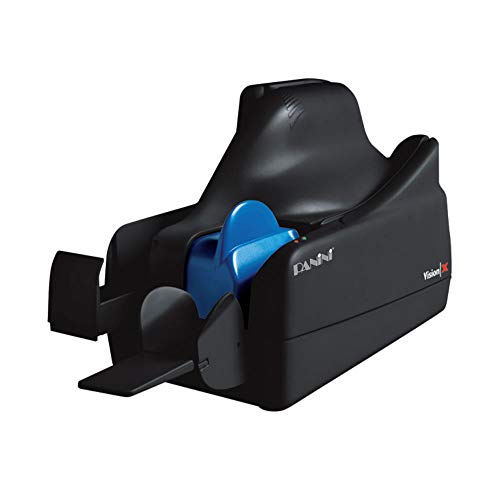
The Panini VX 5050IJ Check Scanner is an excellent choice for businesses looking to streamline their check processing with its impressive 50 documents per minute (DPM) capability and a 50-document feeder. This inkjet scanner offers best-in-class reliability and superior image quality, ensuring flawless document handling and accurate MICR reading. Designed for remote deposit and branch capture, it leverages Check 21 for distributed check capture solutions. With a low total cost of ownership, it not only lowers operational costs but also protects your investment while enhancing customer experience. Despite mixed reviews on reliability, its performance remains remarkable for businesses.
Best For: Businesses seeking a reliable and efficient solution for high-volume check processing with advanced capture features.
Pros:
- Best-in-class reliability with superior image quality.
- High-speed processing at 50 documents per minute, enhancing operational efficiency.
- Low total cost of ownership, optimizing return on investment.
Cons:
- Mixed reviews on long-term reliability, with some issues reported after six months.
- Compatibility challenges with certain software installations.
- Customer support experiences may vary, with recommendations to purchase from banks for better assistance.
Epson CaptureOne Single Feed Check Scanner Model: A41A266511

For businesses seeking efficiency and reliability in check processing, the Epson CaptureOne Single Feed Check Scanner Model A41A266511 stands out with its impressive scan speed of 500 mm/s. This external document scanner utilizes a contact image sensor, delivering crisp scans in 256-level grayscale or black and white. With dimensions of 6.30 inches wide and 14 inches deep, it fits comfortably on your desk. It handles documents ranging from 4.8 to 9 inches in length, ensuring versatility. Plus, its USB 2.0 connectivity makes setup a breeze, allowing you to focus on what matters most—your business.
Best For: Businesses looking for an efficient and reliable solution for check processing and document scanning.
Pros:
- High scan speed of 500 mm/s enhances productivity.
- Compact dimensions make it suitable for limited desk space.
- Supports a range of document sizes for versatile use.
Cons:
- Limited to grayscale and black and white scanning options.
- External form factor may require additional space for setup.
- USB 2.0 connectivity might be slower compared to newer standards.
Digital Check CX30

Small businesses seeking a reliable, bank-quality check scanner will find the Digital Check CX30 an excellent fit. Weighing just 6.95 pounds, this compact scanner measures 16.1 x 11.1 x 10.12 inches, making it easy to integrate into any workspace. Its printing capability guarantees you won’t compromise on functionality. With a solid customer rating of 4.4 out of 5 stars, users appreciate its ease of use for business banking. However, some mention lighter image quality at banks. Overall, it’s a great choice for instant check deposits, enhancing your banking efficiency and customer service experience.
Best For: Small businesses looking for a reliable and efficient check scanner that offers bank-quality performance at an affordable price.
Pros:
- Easy to use, enhancing the banking experience for small businesses.
- Compact design makes it suitable for various workspace setups.
- Printing capability ensures functionality without compromise.
Cons:
- Some users report lighter image quality when checks are sent to banks.
- Limited customer ratings (14 ratings) may not fully represent broader user experiences.
- Best Sellers Rank indicates it may not be the most popular option in the market.
Panini Vision X – 50DPM, 50 Feed, Without Printer – Model VX5050NJ
Designed for financial institutions seeking reliable check processing solutions, the Panini Vision X – 50DPM offers advanced features that enhance remote deposit and branch capture. This scanner boasts best-in-class reliability, superior image quality, and flawless document handling, ensuring MICR read accuracy. With its distributed capture solution, you can leverage Check 21, reducing operational costs while improving customer experience. Compact and lightweight, it measures 15 x 10 x 10 inches, making it easy to fit into your workspace. Though some users report setup challenges, overall feedback points to its functionality and service excellence, making it a strong contender in the market.
Best For: Financial institutions looking for a reliable and efficient check processing solution that enhances remote deposit and branch capture.
Pros:
- Best-in-class reliability and superior image quality ensure accurate check processing.
- Compact design allows for easy integration into various workspace environments.
- Advanced features support Check 21, lowering operational costs and improving customer experience.
Cons:
- Some users have reported difficulties with initial setup and instructions.
- Issues with magnetic band format compatibility for certain accounting programs.
- Negative feedback regarding seller responsiveness and product reliability after short-term use.
Digital Check CheXpress Scanner WITHOUT Inkjet Printer
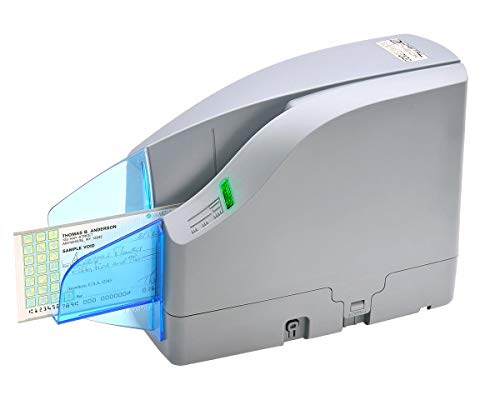
The CheXpress CX30 stands out as an excellent choice for businesses seeking an affordable, reliable remote deposit scanner. Weighing just 4 pounds, this duplex, MICR-enabled device is designed for bank-quality durability and fits easily into your office setup. Although it’s popular among small to medium businesses, be aware of potential jamming issues, particularly with smaller checks. Customer ratings sit at 3.8 out of 5 stars, reflecting mixed feedback on reliability. With a 30-day Amazon return policy, you can explore its compatibility with various banks, but watch for software conflicts, especially on Windows 10.
Best For: Small to medium businesses seeking an affordable and durable remote deposit scanner.
Pros:
- Duplex scanning capability allows for efficient processing of both sides of checks.
- MICR-enabled for accurate magnetic ink character recognition, ensuring reliable check processing.
- Responsive customer support noted by users, providing assistance with setup and troubleshooting.
Cons:
- Jamming issues reported by users, particularly with smaller checks, affecting reliability.
- Mixed feedback on software compatibility, especially with Windows 10, which may complicate use.
- Not ideal for high-volume personal check processing due to potential performance limitations.
Canon CR-120 Check Scanner (Replacement for Canon CR-50 Check Scanner)
Product not found or API error.
For businesses and organizations that demand efficiency, the Canon CR-120 Check Scanner stands out with its impressive processing speed of 120 documents per minute (dpm). Weighing just over 10 pounds and measuring 13.8 x 12.8 x 10.1 inches, it’s compact yet powerful. Users appreciate its speed and image quality, though some report initial setup challenges. While it doesn’t include an ink cartridge for printing checks, it still performs effectively for basic scanning. Occasional jams may occur, but they’re easy to clear. With an average rating of 3.8 out of 5 stars, the CR-120 is a reliable choice for your scanning needs.
Best For: Businesses and organizations seeking an efficient and reliable check scanning solution with fast processing speeds.
Pros:
- Fast processing speed of 120 documents per minute, enhancing productivity.
- Compact design makes it suitable for various office spaces without taking up much room.
- High-quality image output for accurate and clear scans.
Cons:
- Initial setup may be challenging, often requiring tech support for assistance.
- No ink cartridge included for printing on checks, which may be a drawback for some users.
- Occasional jams can occur, although they are typically easy to resolve.
Digital Check CX30 Check Scanner – No Inkjet Printer by Electronics Supply
Product not found or API error.
If you’re looking for a reliable check scanning solution without the added complexity of an inkjet printer, the Digital Check CX30 Check Scanner might just be your best bet. This non-autofeed scanner, weighing in at 5.46 pounds and measuring 15 x 10 x 10 inches, offers a straightforward approach to check scanning. However, be aware that it has a customer rating of 3.2 out of 5 stars, with some users reporting issues with the feeder wheels causing multiple scan attempts. Despite its limitations, it remains available and doesn’t come with an endorser feature, keeping your setup simple.
Best For: Those seeking a simple, non-autofeed check scanner without the need for an inkjet printer.
Pros:
- Easy to set up and use, providing a straightforward scanning solution.
- Lightweight and compact design makes it portable and easy to store.
- No inkjet printer included, simplifying the overall setup.
Cons:
- Customer ratings are relatively low at 3.2 out of 5 stars, indicating potential reliability issues.
- Common problems reported with feeder wheels leading to multiple attempts to scan checks.
- Lacks an endorser feature, which may be necessary for some users.
Factors to Consider When Choosing Check Scanners
When choosing a check scanner, you should consider several key factors that can impact your workflow. Think about scan speed efficiency, document handling capacity, and image quality standards to guarantee you meet your business needs. Additionally, explore the connectivity options available and weigh the cost of ownership to find the best fit for your budget.
Scan Speed Efficiency
Choosing the right check scanner hinges greatly on scan speed efficiency, which can make or break your workflow. You’ll want to look for scanners that measure speed in documents per minute (dpm). Many models offer speeds around 50 dpm, but if you’re processing a high volume of checks, consider those with speeds up to 120 dpm to boost productivity. The scan element type, like Contact Image Sensors (CIS), also plays an essential role in how quickly checks are captured and processed. Additionally, verify the scanner can handle various document sizes without jamming, as this directly affects overall efficiency. For remote deposit capture, prioritize speed to meet the demands of branch and distributed processing environments.
Document Handling Capacity
Scan speed efficiency sets the foundation for a productive workflow, but document handling capacity takes it a step further. When choosing a check scanner, consider how many checks it can process in a single batch. Scanners with larger feeders, like those holding 50 documents, let you scan continuously, reducing the need to reload frequently. A scanner’s speed, measured in documents per minute (DPM), is equally important; for instance, a 50 DPM scanner can handle a high volume in less time. Features like duplex scanning, which captures both sides of a check simultaneously, enhance efficiency. Finally, verify the document feeding mechanism is reliable—jamming can cause delays and hinder your overall productivity in check processing.
Image Quality Standards
While evaluating check scanners, image quality standards play a crucial role in ensuring accurate processing. You’ll want a scanner that produces clear, high-resolution images, as this is essential for effective MICR reading. Look for models with advanced image processing algorithms that enhance document handling and minimize errors. A scanner capable of capturing 256-level grayscale will improve detail, making it easier to read fine print and spot alterations. Additionally, check scanners known for reliability often maintain superior image quality under various conditions, including different lighting and document types. Regular assessments of these image quality standards will help maintain scanning efficiency and accuracy, ultimately impacting your operational costs and customer satisfaction in check processing scenarios.
Connectivity Options Available
When evaluating check scanners, the connectivity options available can greatly impact your workflow and efficiency. Many scanners connect via USB 2.0, ensuring a reliable and widely compatible interface for your PC and other devices. If you need network integration, consider advanced models that offer Ethernet connectivity, allowing multiple users to access the scanner remotely. Wireless options, while less common, provide flexibility for placement and ease of use in various office settings. Be sure to check compatibility with your existing software and systems, especially if you’re eyeing a scanner with specific connectivity features. Some models even support mobile or tablet devices, enabling you to deposit checks directly from your handheld gadgets, enhancing your convenience.
Cost of Ownership
Understanding the cost of ownership is essential when choosing check scanners, as it encompasses more than just the initial purchase price. You’ll need to factor in maintenance and operational costs, which can greatly affect your long-term budgeting. Scanners with a lower total cost of ownership often yield a better return on investment by minimizing ongoing expenses. Consider the reliability and durability of the scanners; frequent repairs or replacements can quickly add up. Advanced features like remote deposit capture and accurate MICR reading can enhance efficiency, potentially lowering processing costs. Finally, user experiences and customer support play a role in ownership costs; difficulties in setup or operation may lead to increased support needs and downtime, affecting your overall efficiency.